We've added the ability to style text in Workspace cards using simple HTML!
This means changing text colors, highlighting text, highlighting things in bold or italics as well as bulleted or numbered lists.
See how to do this here: https://hapara.zendesk.com/hc/en-us/articles/229672368
Showing posts with label Release Notes. Show all posts
Showing posts with label Release Notes. Show all posts
Tuesday, 11 October 2016

Monday, 1 August 2016
Hapara Data Loader Improvements - August 2016
The start of the Northern Hemisphere Academic year is not far off, it will soon be time to load your new students, teachers and classes into Hapara.
We’ve improved the Hapara Data Loader with streamlined workflow and improved functionality. You can take a first look in your school's Hapara Admin Console, and learn more via these links:
The changes include:
- An improved look and feel, including a step by step guide through the Data Loader options.

- Improved process for manually loading spreadsheets:
- Wizard based decisions on how folders, blogs, sites and gmail are used.
- Load a simplified Class spreadsheet with fewer columns.
- Improved documentation including context sensitive help.
- Automatic daily import of Classes, Teachers and Students for Clever and Powerschool users.
- Easy to configure connectivity to the Clever integration tool or to PowerSchool.
- Decide how Hapara class names are generated.
- Wizard based decisions on how folders, blogs, sites, and gmail are used
Tuesday, 26 July 2016
Inline Help Widget - July 2016
Help is just a click away in the Hapara Suite now!
We have added a new help widget that will help you find support articles, release notes and other tips easily, without leaving your Hapara tool.
 If you have a question or need help, click the Help button at the bottom left of the screen.
This will display an expanded Help window which you can use to search for articles. Type your search text in the search box and hit enter to get the top 3 results.

We have added a new help widget that will help you find support articles, release notes and other tips easily, without leaving your Hapara tool.
If you have a question or need help, click the Help button at the bottom left of the screen.
You can search the entire Hapara Knowledge Base from this widget, and submit any questions to our support team if you cannot locate an answer.
Hapara Dashboard Improvements - July 2016
Based on feedback received from our customers, we have updated Dashboard with a simpler, more modern user interface. All the same great functionality in a smoother, faster package.
See below for highlights of the improvements, or please click here for the full article
See below for highlights of the improvements, or please click here for the full article
Tuesday, 3 May 2016
Highlights Release Notes - May 3, 2016
Highlights Focused Browsing supports Google Forms better
In Highlights, when using Focused Browsing with Google Forms, the teacher had to specify two URLs - one for the Google Form itself, and one for the "Thanks" page that is displayed after the Google Form has been submitted. If the teacher only specified the first URL, the students wouldn't be able to successfully submit the form.
Now Highlights automatically adds the second URL - so the teacher only has to specify one URL.
HL extension respects the screenshot quality setting
Highlights was not respecting the Image Quality setting in the Bandwidth Control section of the TDAdmin Highlights page. This reduced the ability of Admins to control the bandwidth that Highlights uses. Highlights now obeys the settings.
Note: Around 3May16, if a teacher comments that the image quality in Highlights has gotten worse, this will be because the TDAdmin setting is now being obeyed. Their IT Administrator can change the setting to change the image quality.
Note: With the default TDAdmin settings sending a student screen image to the teacher takes about 30 to 60 kilobytes of network bandwidth. Lowering the image quality in TDAdmin reduces this to about 10 kilobytes.
Thursday, 31 March 2016
Highlights Release Notes - March 31, 2016
Improvements
Focused Browsing feature now optional
The Highlights TDAdmin page now contains a setting "Enable Focused Browsing" which defaults to Yes. If set to No. the Focused Browsing functionality in Highlights is hidden from teachers.
“Extension Installed” diagnostic test is quicker
In some cases, the first test in the Student Diagnostic page was taking a long time before it failed. Some students erroneously thought the test had passed. Now the first test takes at most 10 seconds to fail.
Highlights works better on iPads
Highlights now works much better on iPads. Several issues have been resolved.
Note: On the iPad, a student panel “drag and drop” is initiated by long-clicking on the student panel header. This helps Highlights distinguish between teacher drag and drop actions and other click actions.
Monday, 29 February 2016
Dashboard Release Notes - February 29, 2016
Improvements
- Updated backend processes to refresh student name details from google when a student is added manually to td.students group through a school's Google Apps admin console. Previously the name was appearing overnight.
- Return only active student domains when fetching list of classes to display to Teachers.
Smart Share
Fixed the following issues with Smart Share:
- Added a validation check when you try to Smart Share files on which you do not have adequate access rights. Smart Share window now shows a message indicating which file cannot be shared.
- Fixed the issue where the Smart Share was not working on the Class Info page.
Wednesday, 17 February 2016
Highlights Release Notes - February 8, 2016
Bug Fixes
Focused Browsing icon does not display after student logs out & in
Sometimes after a student logged out and logged back in, during a Focused Browsing session, Highlights did not display the Focused Browsing icon on the student panel (even though the student was focused). This issue has been resolved.
Extension prevents users accessing the Internet via proxy server
The Highlights extension was erroneously stopping a dialog popping up that asked the student for a username and password to log into a proxy server. This issue has been resolved.
Front end does not display tabs with blank urls
Unusually, some games open a new Chrome tab with no URL. An example is Zuma Free Brain game. Highlights was not displaying these tabs in the Browser Tabs or Activity Viewer panes. Now, in the Browser Tabs pane, Highlights shows the title of the Zuma page. And in the Activity Viewer pane, Highlights represents the URL with the text "blank".
Improvements
Added 150 & 180 minute Focused Browsing durations
The list of Focussed Browsing durations has been expanded
Thursday, 28 January 2016
Highlights Release Notes - January 27, 2016
Bug Fixes
Adding or removing a student made Highlights unavailable for a few minutes
After a Teacher added or removed a student from a class via the Class Info page, they could not access Highlights for the next few minutes. This issue has been fixed.
Time on Snap email incorrect
The time shown on the Snap email sent by teachers was not obeying the school timezone. It is now.
Tuesday, 26 January 2016
Workspace Release Notes - January 25, 2016
Improvement and Bug Fixes
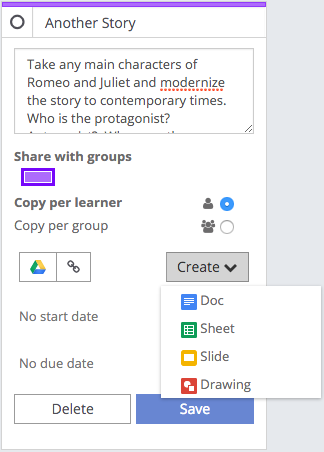
- Teachers and learners can now create new Google Docs / Sheets / Slides / Drawings from within a card in Workspace instead of needing to create these separately and then load them from Google Drive.
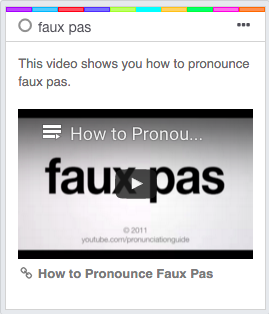
- When adding a Youtube or Vimeo link to a Goal/Resource/Rubric card the video itself will now be embedded and be able to be played in the Workspace.
- Updated French translations
- Previously students couldn't visit Hapara Workspace links that included their class code. They now can.
Tuesday, 19 January 2016
Dashboard Release Notes - January 11, 2016
Improvements
French Translations Improvements
The French translations on Hapara Dashboard User interface (text and captions) have been updated to include additional translations.

Hapara Dashboard Admin Page Improvements
Simplified many of the technical error messages generated by Data Loader to make them more easier to understand and interpret.
Highlights Release Notes - January 15, 2016
Bug Fixes
Can't send Focused Browsing to Group from Activity Viewer or Snaps page
Teachers can now send Focused Browsing session to a Group from the Activity Viewer and Snaps pages.
Access to dictionary.reference.com blocked during Focused Browsing to dictionary.com
The website dictionary.com automatically redirects to dictionary.reference.com. When a teacher Focused Browses to dictionary.com the students should be allowed access to dictionary.reference.com. An issue meant Highlights was not handling this case. This issue has been fixed.
Sundry
Sundry small style improvements to the user interface of Highlights.
Improvements
Highlights displays pdfs opened in Chrome
A student can open a downloaded pdf in a Chrome tab. Highlights now displays the pdfs opened by students in Chrome in the Browser Tabs, Activity Viewer and Current Screens panes.
Focused Browsing "Restore tabs after Release" checkbox ticked by default
When a teacher opens the Focused Browsing panel, the "Restore tabs after Release" checkbox is now checked by default.
Workspace Release Notes - January 14, 2016
Bug Fixes
- When you archive a Workspace, it now not only moves the Workspace to the “Archive” page, it also moves the Google Drive folder into an Archive folder in Google Drive, organised by year.
Archive page: 
Google Drive:
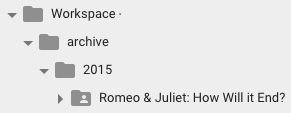
Google Drive Path:

- Fixed an issue where thumbnail images were not showing in Public Workspaces if they’d been added from Google Drive.
- If a teacher attached an image to a card from their Google Drive, learners were not seeing the image due to a permissions issue. This has been fixed.
- When using an iPad and clicking on Share this Workspace the copy button wasn’t working, this has been fixed.
- The email feature that emails all learners on the Workspace was only including the original class on the Workspace and not any classes or learners added later. This has been fixed.
- Fixed the group name craziness that could occur if a class was dragged into the name area on the groups page.
- When copying a Workspace we were a little trigger happy and were showing an error message even when copying had succeeded. This should no longer happen.
- The email function was only emailing the initial class or groups that were on the Workspace and leaving out any classes, groups or learners who had been added later. This has now been fixed.
- If you shared a Workspace publicly, then changed a card, unshared and reshared the Workspace, the change you made was not showing on the publicly viewed When a school runs archiving the Workspaces for the archived classes will still be available to learners, under the “Other Workspaces” heading as the class they were originally associated with is no longer available.
Wednesday, 6 January 2016
Dashboard Release Notes - January 6, 2016
Improvements
Automation including Archiving
Made improvements to the archival processes to automatically retry execution in case the process experiences any issues to reduce the need for manual intervention.
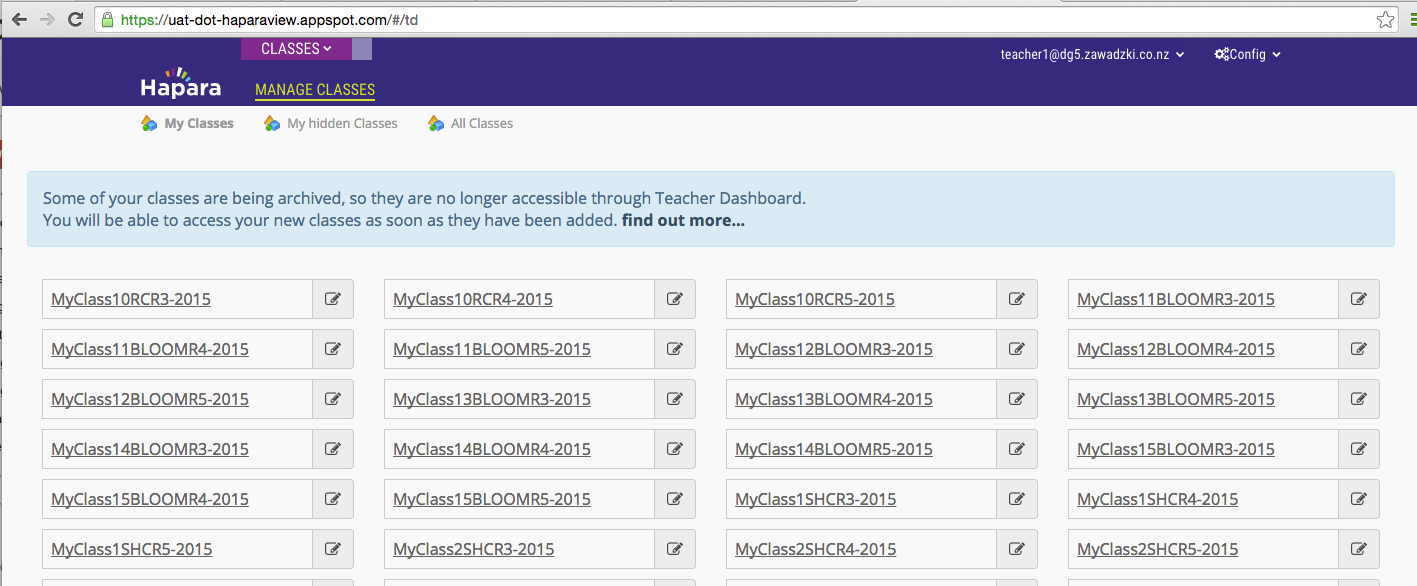
Dashboard classes are now locked down during Archiving
Dashboard will now display a message and will restrict access to classes for schools that are undergoing archiving. As a result teachers or admins will have access to classes that are being archived. This is to prevent errors that may arise when users inadvertently use Dashboard when archiving is in progress for a particular class.
Bug Fixes
- Re-enabled access to Archive Classes for Administrators. This will be enabled for schools that have requested archival so they can initiate it at the appropriate time.
- Archived Folders now retain student names on Drive folders after they are archived.
- Fixed an issue where folders were sometimes being duplicated during archiving.
- Fixed an issue where some students were not set to read-only access for their archived folders.
- Fixed a problem in archiving where the archive was set as complete even when there were outstanding archive issues that needed to be resolved.
Data Loader Improvements
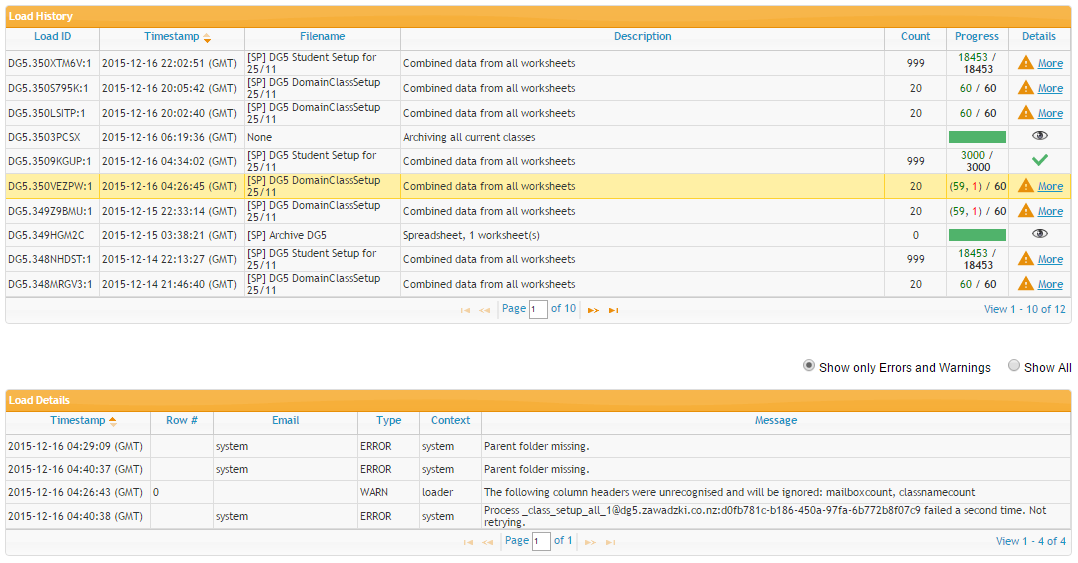
The Data Loader Status screen has been simplified to make it easier to interpret Data loads. Key changes are:
- The Load Summary table now shows a single row per Data Load file that has been uploaded.
- New icons appear in the Details column of the Load Summary table to indicate status of the file processing.
- Introduced filtering on Load Details table. Default display is to show only Errors and Warnings to make it easier to review issues.
Bug Fixes
- Fixed an issue with Smart Share where Teachers were not granted edit access to a file if they already had read-only access on that file. Now as per standard Smart Share behavior the teachers will have edit access for 60 minutes after which the previous permissions will be restored.
- Fixed an issue with Smart Share where a spinning wheel was displayed constantly next to File Title when a teacher created a new file to Smart Share with their students.
- Fixed an issue with the refresh rate on document thumbnails.
Wednesday, 16 December 2015
Workspace Release Notes - December 15, 2015
Bug Fixes
Some public workspaces were not showing the pictures that you would see in the Workspace if you were a teacher of that Workspace. This has been fixed.
Highlights Release Notes - December 16,2015
Improvements
Improve Current Screen "Save"
From the Highlights Current Screen page, the teacher can click on an image to enlarge it. The enlarged image now shows the student name, date/time the image was taken and the URL the student was browsing. The teacher can save the image to a file and the saved image also includes these details.
User documentation links
Highlights now contains links to several articles that explain individual Highlights features and events in detail.
Student Groups and Sorting
The Browser Tabs and Current Screen tabs now use the same student groups and sorting order always - improving the usability of the product.
Show active tab in bold
In the Browser Tabs view, the tab that the student is looking at is now bolded (as it was in Interact).
Improve blank student panel process
Highlights provides teacher and student tools to help diagnose blank student panels. The blank student panel link "Flag issue" has been re-labelled "Investigate" and the associated pop-up window has been improved to help teachers and students resolve more causes more quickly. Further detail on the pop-up window is available here.
Bug Fixes
Close Tabs restores student tabs
When the teacher used the "Close Tabs" button to close a focused browsing session, Highlights was not obeying the "Restore tab settings" value the teacher set when they started the focused browsing session. Highlights now honors the setting.
Security Error switching classes from the Current Screen Tab
A security issue meant that sometimes teacher on the Highlights "Current Screens" screen uses the class pull-down menu to switch to another class, and gets a "access denied" message. This has been fixed.
Current Screens not updating to when student closes tab
The Current Screen now updates when a student closes a tab
Unresponsive Device messages with multiple Teachers
When two teachers were watching the same class, and an unresponsive device came back on line, only one teacher's view was updated to say the device is on line. This issue has been resolved.
Wednesday, 9 December 2015
Highlights Release Notes - December 09, 2015
Improvements
Highlights supports school-specific Administrators for multi-school customers
Highlights now supports school-specific Administrators for multi-school customers. So Highlights now mirrors the existing Teacher Dashboard security rules for Administrators.
Highlights supports single-school extended teacher access
Highlights now obeys (in single school domains) an existing preference that gives teachers access to classes other than the ones they teach. So Highlights now mirrors the existing Teacher Dashboard security rules.
Removed the option to apply Highlights to a list of classes
The TDAdmin Highlights page allowed Administrators to restrict the Highlights to a specified list of classes. This was intended for use with new customers to allow a gradual rollout. It was mis-interpreted by existing Interact sites as a way, during a transition period, to turn Highlights on for a specified list of classes while retaining Interact for the bulk of classes. When used in this way, Dashboard and Highlights did not act as expected.
On reflection, this feature has limited usefulness. So the ability for Administrators to restrict Highlights availability to a specified list of classes has been removed. This simplifies the set-up process and avoids confusion
Workspace Release Notes - December 09, 2015
Bug Fixes & other changes
- Fixed an issue where teachers couldn't copy a publicly shared Workspace if sharing was not enabled for their school/domain. You can now copy public Workspaces regardless of your own sharing settings.
- Fixed an issue with sharing and un-sharing documents on a public Workspace.
- Removed an error message that said “Return evidence action is not available.” if a teacher tried to return evidence that had already been returned by another teacher.
Tuesday, 8 December 2015
Highlights Release Notes - November 30, 2015
Improvements
Highlights supports school-specific Administrators for multi-school customers
Highlights now supports school-specific Administrators for multi-school customers. So Highlights now mirrors the existing Teacher Dashboard security rules for Administrators.
Highlights supports single-school extended teacher access
Highlights now obeys (in single school domains) an existing preference that gives teachers access to classes other than the ones they teach. So Highlights now mirrors the existing Teacher Dashboard security rules.
Wednesday, 2 December 2015
Highlights Release Notes - November 16, 2015
Bug Fixes
Student Logged into Multiple Devices Icon
Improved the icon for the students logged into multiple devices
Student Status not updating intermittently
Fixed a bug to improve the student statuses from the Front end
Viewing the Current Screen from Snaps tab now opens a new tab
When a teacher is using Snaps and selects a recently taken snapshot, a new tab now opens to display the image.
Non-Students Accounts are now ignored
Non-Hapara users are now ignored and so no longer count towards the "multiple students" icon, on the user interface.
Sundry
Sundry small improvements to the user interface, reliability and performance of Highlights.
Subscribe to:
Posts (Atom)