Thursday, 21 April 2016

UPDATE: Teacher Dashboard Service Disruption

UPDATE: As of 04:30pm PST, We have diverted traffic to our backup platform. Users may have to refresh their browsers to gain access into Teacher Dashboard. If you encounter any further issues, please submit a support ticket and we will investigate right away

-------------------------


We are currently experiencing a service disruption with Hapara Dashboard and its only affecting our Southern Hemisphere customers. Teachers will not be able to access their Teacher Dashboard.

They will see an error stating “over quota”.

Our team is doing everything in our part to get Teacher Dashboard working again.


Thursday, 31 March 2016

Highlights Release Notes - March 31, 2016

Improvements


Focused Browsing feature now optional
The Highlights TDAdmin page now contains a setting "Enable Focused Browsing" which defaults to Yes. If set to No. the Focused Browsing functionality in Highlights is hidden from teachers.

“Extension Installed” diagnostic test is quicker
In some cases, the first test in the Student Diagnostic page was taking a long time before it failed. Some students erroneously thought the test had passed. Now the first test takes at most 10 seconds to fail.

Highlights works better on iPads
Highlights now works much better on iPads. Several issues have been resolved.

Note: On the iPad, a student panel “drag and drop” is initiated by long-clicking on the student panel header. This helps Highlights distinguish between teacher drag and drop actions and other click actions.

Monday, 29 February 2016

Dashboard Release Notes - February 29, 2016

Improvements

  • Updated backend processes to refresh student name details from google when a student is added manually to td.students group through a school's Google Apps admin console.  Previously the name was appearing overnight.
  • Return only active student domains when fetching list of classes to display to Teachers.

Smart Share

Fixed the following issues with Smart Share:

  • Added a validation check when you try to Smart Share files on which you do not have adequate access rights.  Smart Share window now shows a message indicating which file cannot be shared.
  • Fixed the issue where the Smart Share was not working on the Class Info page.

Friday, 26 February 2016

RESOLVED: Workspace Service Disruption

UPDATE: As of 8:40am PST, the Workspace outage has been resolved. If you encounter any further issues, please submit a support ticket and we will investigate right away.

-------------------

We are currently experiencing a global service disruption with Workspace. When users, primarily students, try to access mystudentdashboard.com, or workspace.teacherdashboard.com, they see a Server Error. Our team is doing everything they can to resolve this issue as quickly as possible.

In the meantime, students or teachers experiencing this issue can access Workspace by adding "https://" to the beginning of the URL or use the below links:

https://workspace.teacherdashboard.com
https://mystudentdashboard.com

We will update this post as soon as the issue has been resolved. Please open a ticket at support.hapara.com or email us at support@hapara.com if you have any questions or further issues.

Best regards,
Hapara Support

Wednesday, 17 February 2016

Highlights Release Notes - February 8, 2016

Bug Fixes


Focused Browsing icon does not display after student logs out & in
Sometimes after a student logged out and logged back in, during a Focused Browsing session, Highlights did not display the Focused Browsing icon on the student panel (even though the student was focused). This issue has been resolved.

Extension prevents users accessing the Internet via proxy server
The Highlights extension was erroneously stopping a dialog popping up that asked the student for a username and password to log into a proxy server. This issue has been resolved.

Front end does not display tabs with blank urls
Unusually, some games open a new Chrome tab with no URL. An example is  Zuma Free Brain game. Highlights was not displaying these tabs in the Browser Tabs or Activity Viewer panes. Now, in the Browser Tabs pane,  Highlights shows the title of the Zuma page. And in the Activity Viewer pane, Highlights represents the URL with the text "blank".

Improvements


Added 150 & 180 minute Focused Browsing durations

The list of Focussed Browsing durations has been expanded

Thursday, 28 January 2016

Highlights Release Notes - January 27, 2016


Bug Fixes


Adding or removing a student made Highlights unavailable for a few minutes
After a Teacher added or removed a student from a class via the Class Info page, they could not access Highlights for the next few minutes. This issue has been fixed.
Time on Snap email incorrect

The time shown on the Snap email sent by teachers was not obeying the school timezone. It is now.

Tuesday, 26 January 2016

Workspace Release Notes - January 25, 2016

Improvement and Bug Fixes
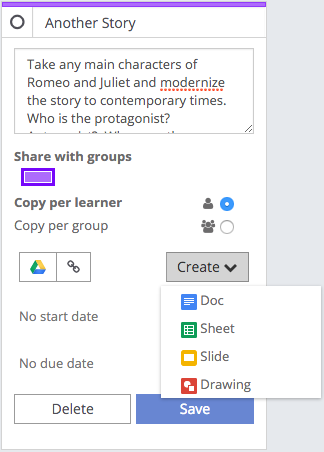
  • Teachers and learners can now create new Google Docs / Sheets / Slides / Drawings from within a card in Workspace instead of needing to create these separately and then load them from Google Drive.

Screen Shot 2016-01-20 at 1.44.30 PM.png
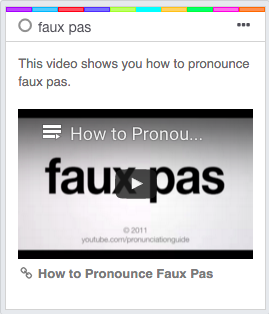
  • When adding a Youtube or Vimeo link to a Goal/Resource/Rubric card the video itself will now be embedded and be able to be played in the Workspace.


Screen Shot 2016-01-19 at 7.17.37 PM.png

  • Updated French translations
  • Previously students couldn't visit Hapara Workspace links that included their class code. They now can.